Join the LinkedIn Public Group – NextOps: Dev, Cloud & Intelligence to connect with professionals, share knowledge, ask questions, and grow together.

Azure DNS Explained in Simple Language: A Complete Hands-on Guide with Hostinger, Azure VM, and Real-World Examples
Learn Azure DNS from the ground up with simple explanations and real-world examples. This guide covers A, CNAME, MX, TXT, NS, SOA, Alias records, TTL, DNS resolution, caching, and custom domain configuration using Azure DNS, Azure Virtual Machines, Azure App Service, and Hostinger. Whether you're preparing for the AZ-104 exam or building your first Azure-hosted website, this hands-on guide will help you understand how DNS works in Azure.
NETWORKINGAZUREAZ-104
Madhubanti Jash
7/4/202614 min read
Prerequisites
You have passed AZ-900 or you have basic knowledge of Azure
If you are unsure where to begin your journey to learn Azure Networking, START HERE


What is DNS?
Imagine you have a friend called Tom in Poland. Tom has phone number +48xxxxxxxxx.
Now Tom moves to US and changes his phone number. But you just update his contact information with new phone number.
Irrespective of he was in Poland or moved to US, you remembered him as Tom, you did not address him using his phone number.
DNS (Domain Name System) is like a phonebook of the internet. People remember names like:
www.google.com
But computers communicate using IP addresses like 142.250.190.78
DNS converts:
www.google.com -> 142.250.190.78
What is DNS Zone?
A DNS Zone is simply a container that stores DNS records.
Think of a folder.
Folder = DNS Zone
Files = DNS records
Example:
What is A and AAAA record?
A record is Address Record. It maps a hostname to an IPv4 address.
www.unpacktechwithmadhu.net ->52.170.10.20
AAAA record is same as A record but for IPv6.
www.unpacktechwithmadhu.net -> 2001.db8::1
Later in the article we shall also learn about other mentioned terminologiees.
What is Azure DNS?
Azure DNS is Microsoft's cloud service that hosts DNS zones. Instead of keeping DNS records at GoDaddy or Cloudflare, you can host them in Azure.
Let us go through a practical example:
Goal:
I have an unused domain unpacktechwithmadhu.net in Hostinger. The DNS zone name servers are also in Hostinger.
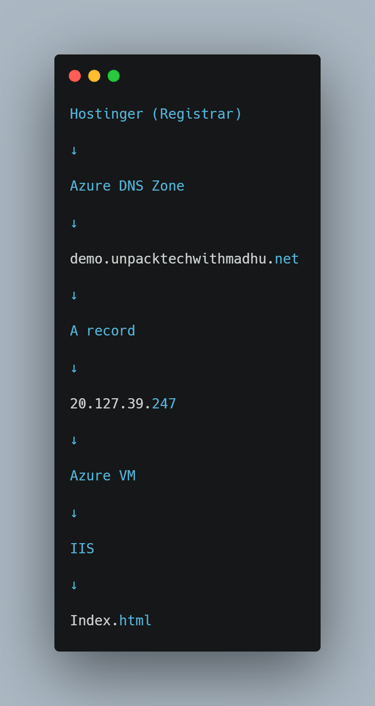
But now I want to host and access a website in an Azure VM using demo.unpacktechwithmadhu.net as well as I want to move my DNS zone to Azure.
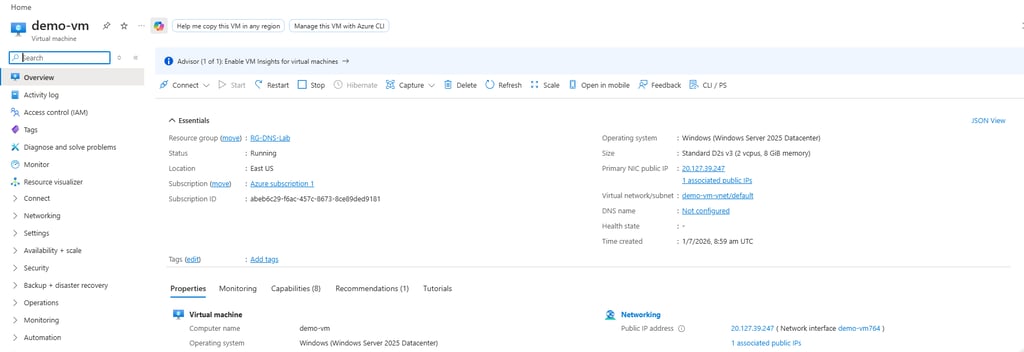
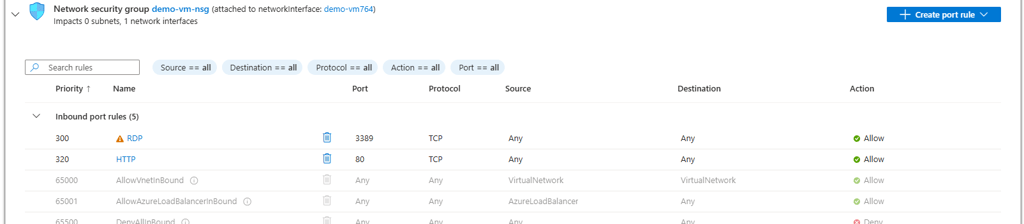
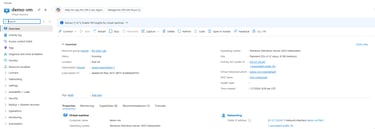
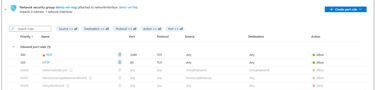
Step 1: Create a Azure Windows VM and note the public IP.
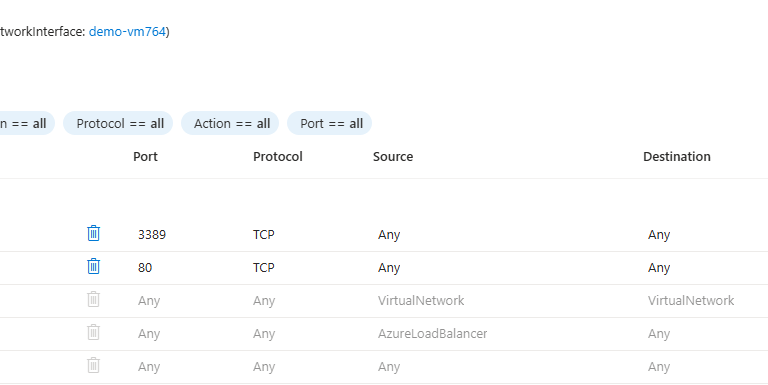
Ensure that VM NSG allows RDDP and HTTP inbound
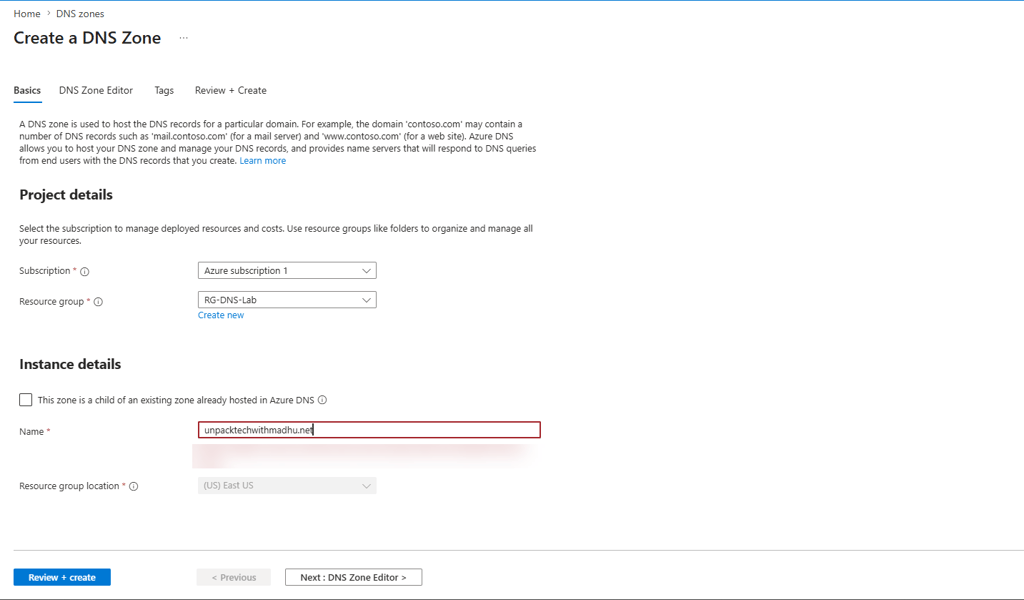
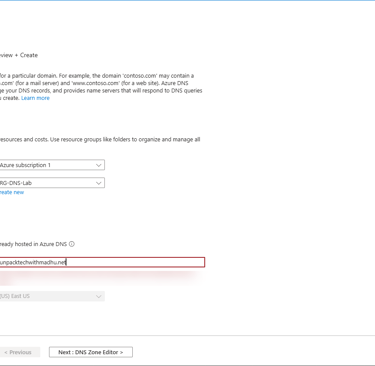
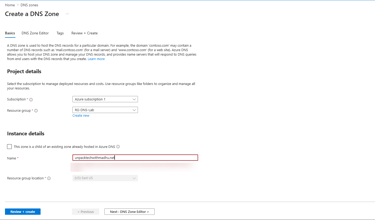
Step 2: Create Azure DNS
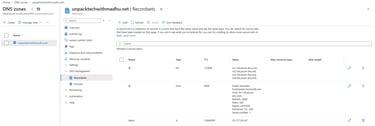
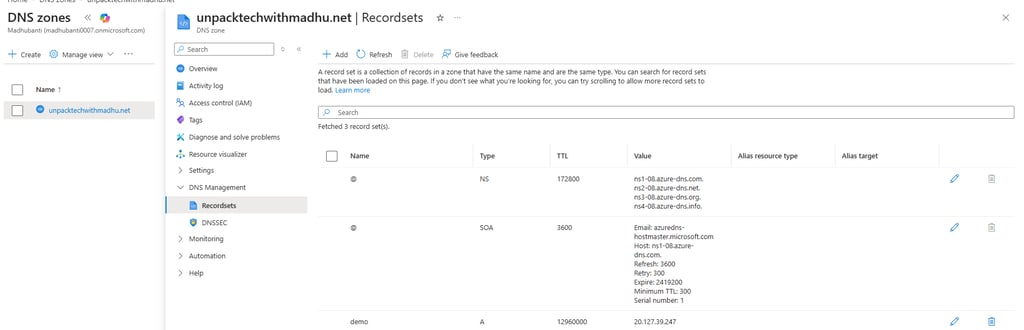
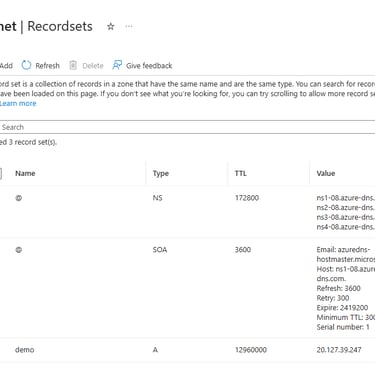
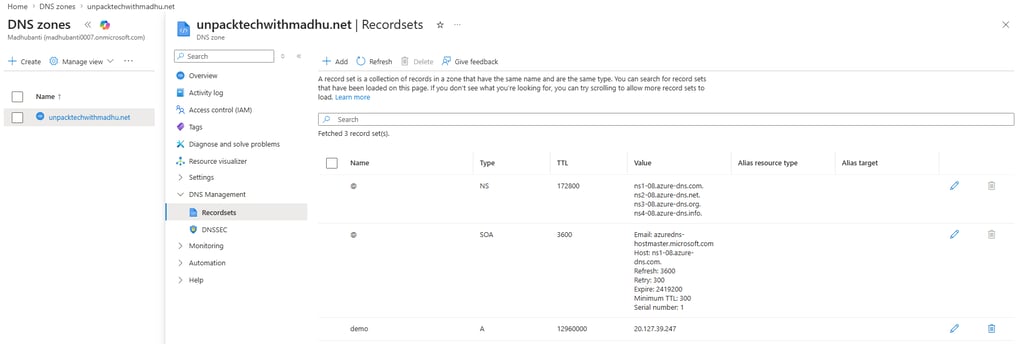
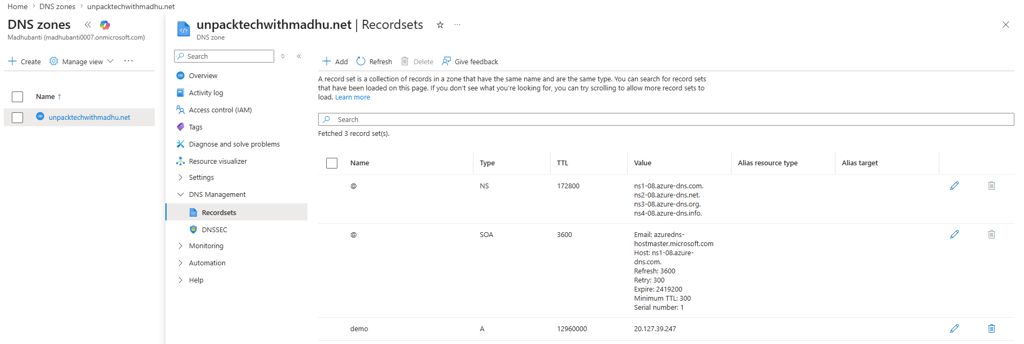
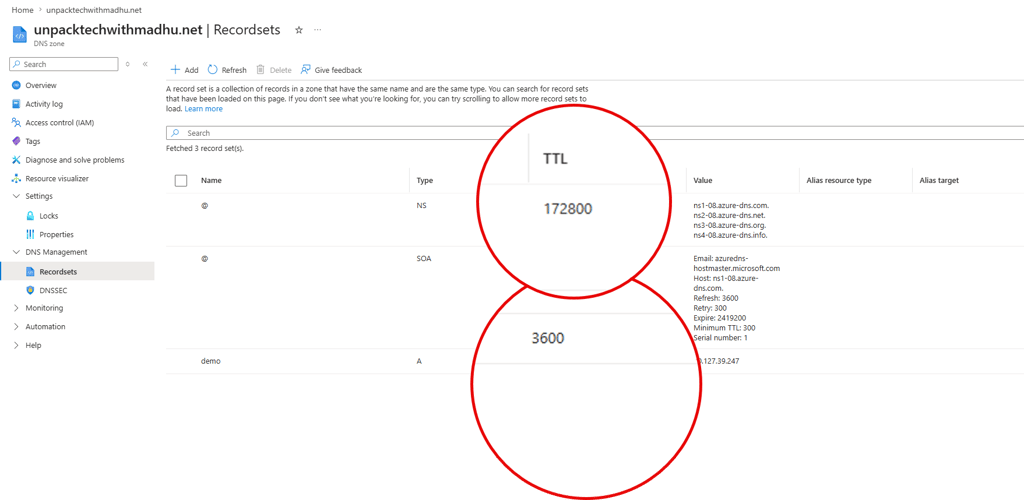
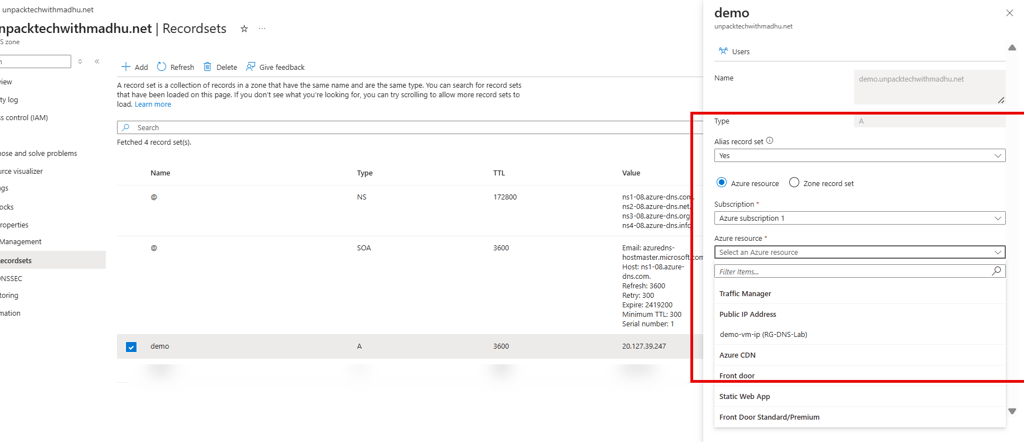
Step 3: Go to deployed Azure DNS resource and update the record set. NS and SOA will auto appear.
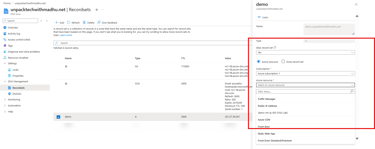
As you want to access demo.unpacktechwithmadhu.net, put the A record accordingly. The value will be the public IP of the VM.
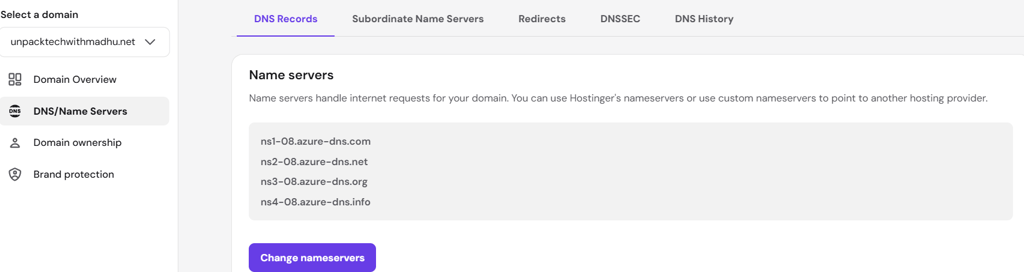
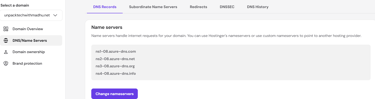
Step 4: Now as above you see the nameservers, you need to update those nameservers in Hostinger. Because so far Hostinger has their nameservers registered.
Step 5: Now login to the VM and enable IIS
Open Server Manager.
Add the Web Server (IIS) role.
Browse to: C:\inetpub\wwwroot
Replace the default iisstart.htm with your own index.html
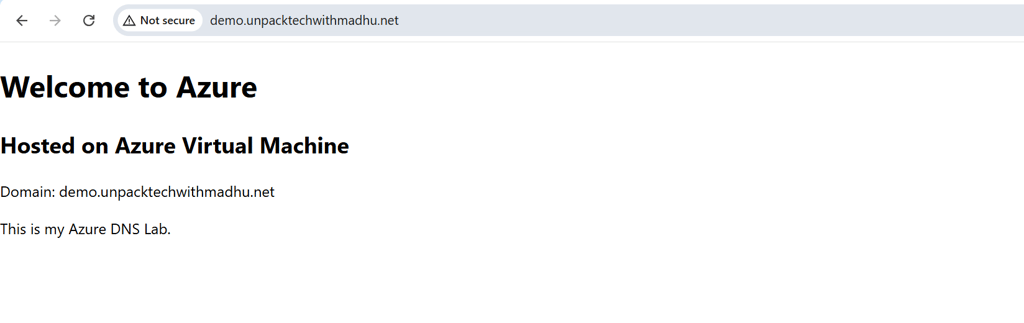
Step 6: Now in your browser hit:
http://demo.unpacktechwithmadhu.net/
You should see below:
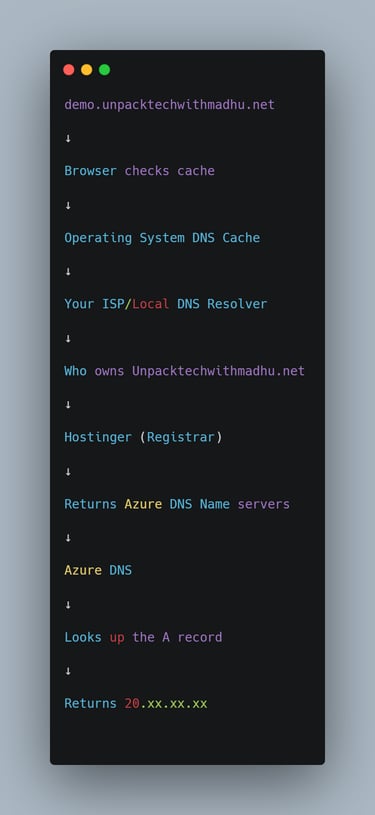
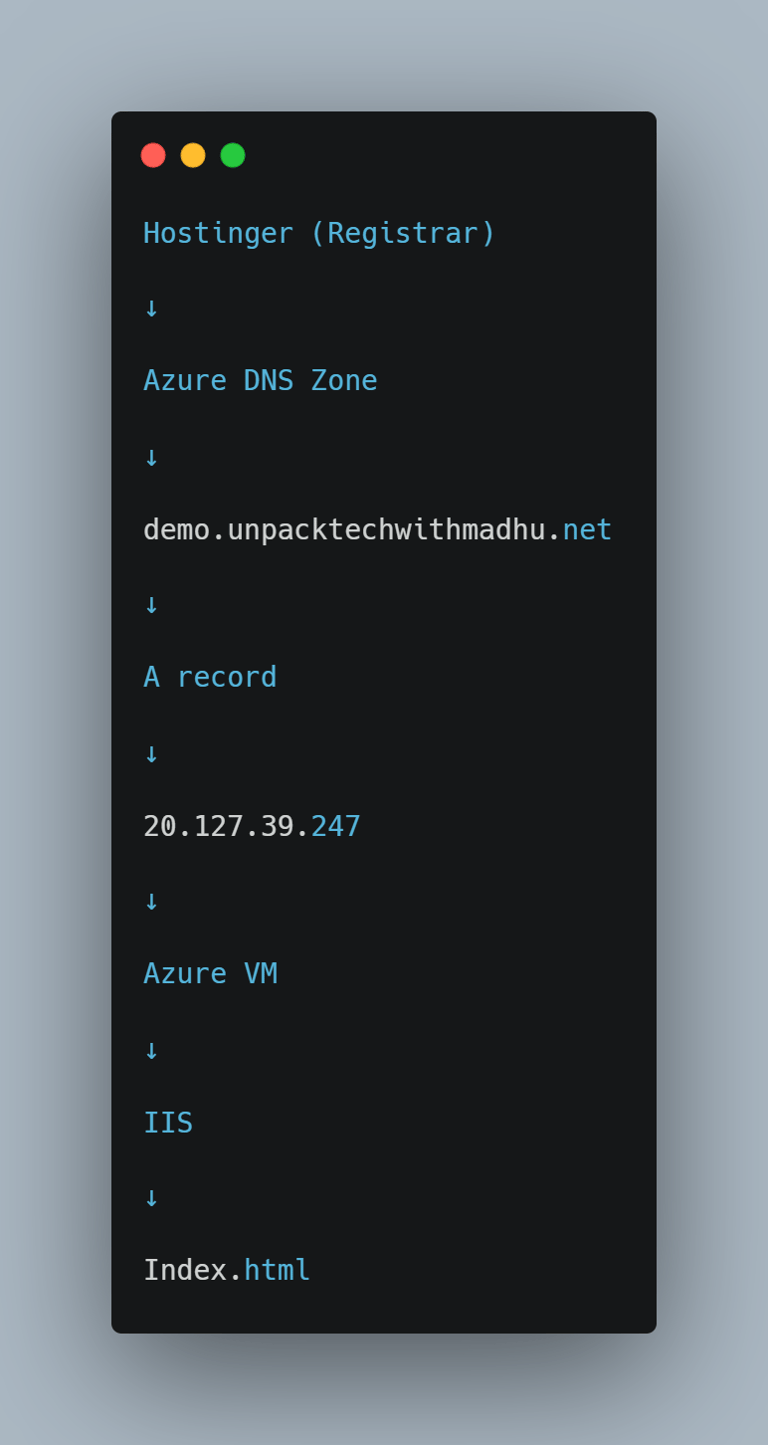
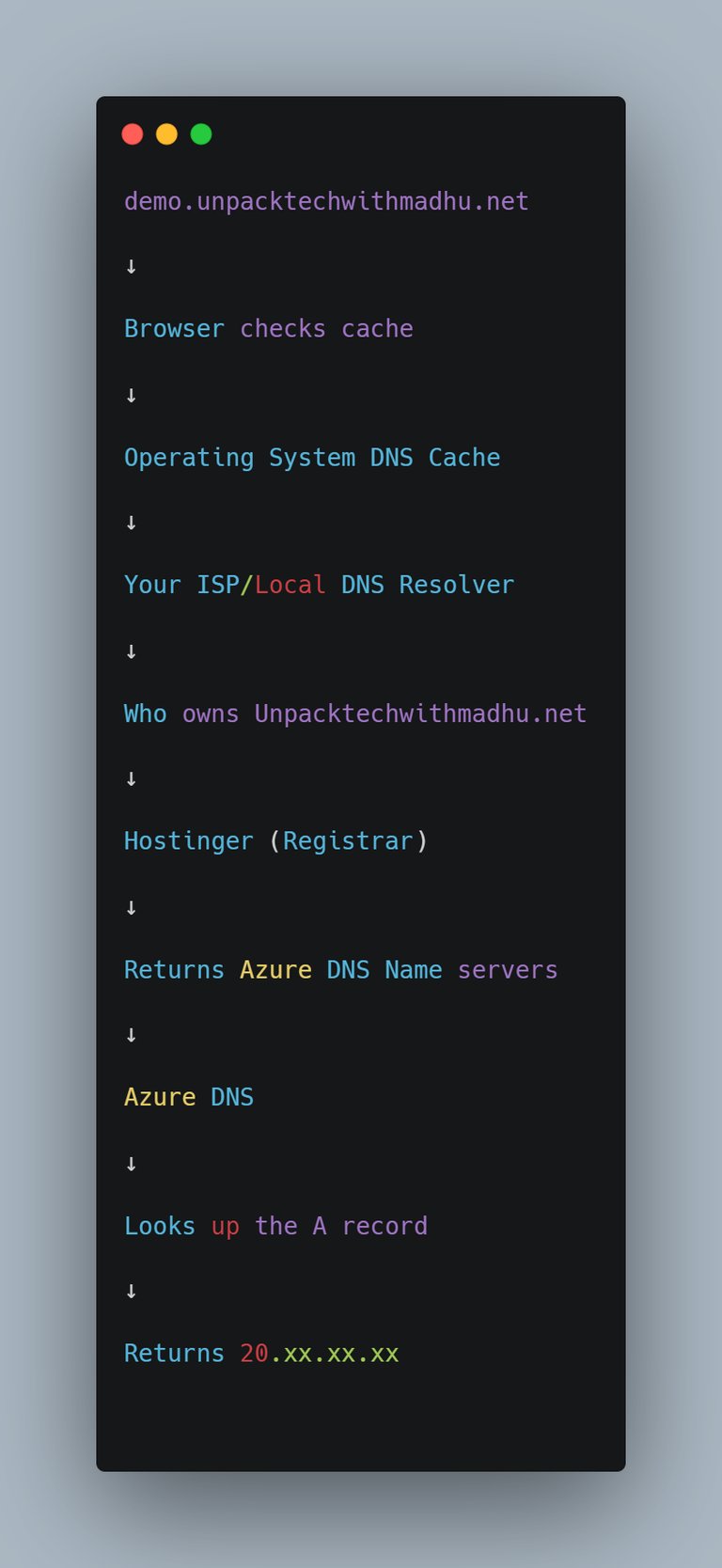
DNS resolution flow
Let us understand how above flow works.
When someone visits demo.unpacktechwithmadhu.net:
Hostinger as registrar identifies and informs that nameservers are hosted in Azure DNS zone.
Hostinger's job became only to answer "For unpacktechwithmadhu.net, the authoritative DNS servers are the Azure DNS servers"
Azure DNS resolves it to your VM's public IP based on the A record,
and IIS on the VM serves your demo webpage.
Authoritative DNS Server
Authoritative DNS server is the one which hosts nameservers. Unlike recursive resolver (an ISP or public DNS service like 1.1.1.1 or 8.8.8.8) , it does not use cache to answer any query. It gives final, official answer by querying its own data which is stored in nameservers.
When they answer any query, they include AA flag, informing the answer is direct and IP is official.
Why each Azure DNS Zone has multiple Nameservers?
When you host a domain, Azure DNS Zone by default creates four name servers to ensure high availability.
They belong to different Azure regions to ensure Geo-Redundancy and meeting 99.99% uptime SLA.
If you are querying a nameserver from Europe, your request routes to a region in Europe, if the query is from US,request will route to an Azure region in US.
Each of those 4 nameservers utilizes "Anycast Routing" . Instead of being one single physical machine, these nameservers are broadcast by a globally distributed cluster of servers across multiple Azure regions. You must delegate your domain to all four assigned nameservers in your domain registrar (in our case it is Hostinger).
Does every time authoritative DNS server gets called?
The step by step Recursion process
In first visit the query goes to Authoritative DNS server and then the returned result is stored in cache.
Below are example of recursive resolvers.
When user types the demo.unpacktechwithmadhu.net, recursive resolver asks:
Root Server: The recursive resolver first asks Root Server.The Root server says "I do not know where is unpacktechwithmadhu.net but here is the contact info for .net directory."
TLD Server: Then recursive resolver asks TLD Server. TLD server says "I do not know either, but when I look at the registrar (Hostinger), I see Azure DNS is the authoritative server which owns unpacktechwithmadhu.net"
Authoritative Server: Then recursive resolver asks Authoritative Server (Azure DNS). When Azure DNS answers with IP, recursive resolver returns it to your computer and you are able to open the website.
The secret to speed: Caching
To bypass this exhausting recursive process, when recursive resolver gets the IP, it stores in a short lived cache. Next time when user types "demo.unpacktechwithmadhu.net", instead of going through wholee process, it returns the IP from its cache.
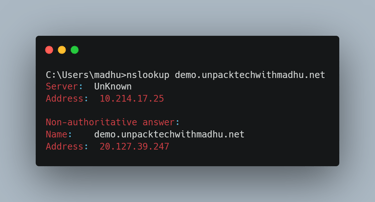
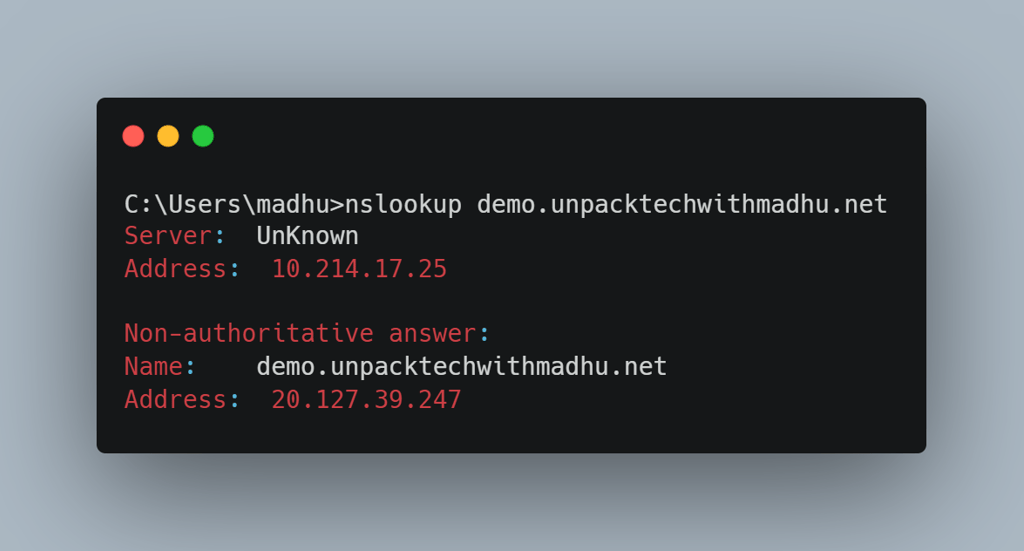
How to verify if answer is returned from the Authoritative Server or cache?
As you see in below image, the flag "Non Authoritative" implies that the returned answer was from one of the available caches.
What is the role of TTL?
The authoritative DNS server sets the TTL for each DNS record.
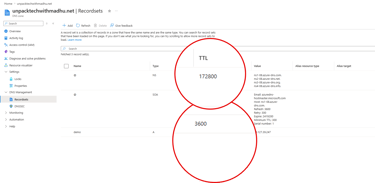
In Azure,the TTL (in this case it is 3600 seconds) is configured on the DNS record in the Azure DNS Zone. Recursive DNS Resolvers use this TTL to determine how long they may cache the record before querying the authoritative server again.
Important: The TTL is not a timer running inside Azure DNS.
Azure DNS always has the latest record. The TTL is an instruction sent to recursive resolvers.
Common Glitch:
When you have updated A record, until TTL expires, recursive resolvers will continue to serve old IP to your computer.
While you cannot control public resolvers, you can flush your operating system or browser cache. Otherwise in general, DNS propagation can take even more than 24 hours.
What is CNAME?
Suppose you create an app "madhuapp" using app service. Azure automatically gives it a hostname like madhuapp.azureewebsites.net.
Internally it may point to IP 20.x.x.x today and tomorrow to IP 20.x.x.y. So if you only rely on A record which is pointing to an IP, your call for the app can break.
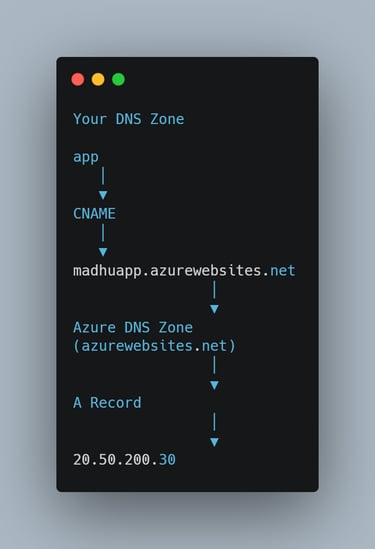
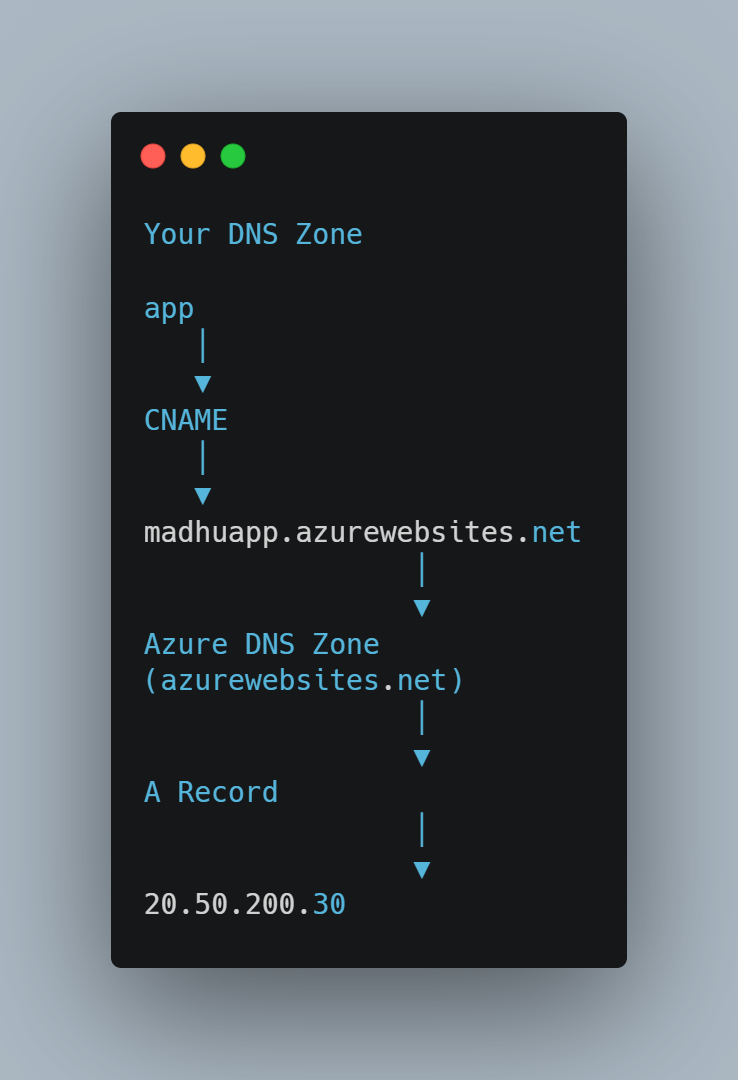
Here comes the role of CNAME. Instead of relying on A record, you create
There is still A record because any hostname will need to be resolved to an IP. But that A record is managed by Azure under azurewebsites.net DNS zone,not by you under the DNS zone unpacktechwithmadhu.net you created. When there will be IP change for app service app, update of A record will be taken care of by Azure. When you create the app service, you need to ensure that you add the custom subdomain app.unpacktechwithmadhu.net and validate it
What is MX record?
An MX (Mail Exchange) record is a DNS record that specifies which mail server is responsible to receive the email for a domain.
if I have hostinger mail id info@madhu.pro, your MX record will look like
If there are multiple MX records (multiple mail servers), the one with the lowest priority will be chosen.
Alias Record, TXT and SOA
Alias Record:
While you can apply CNAME for subdomain demo.unpacktechwithmadhu.net, you may not apply it for the root domain unpacktechwithmadhu.net. Azure comes with a special feature "Alias Record". Alias record does not replace the need of A or AAAA record, it connects the record to a supported Azure resource, so when underlying IP address change, Azure updates it automatically, rather than require you to type the IP manually. An Alias record can be applied to both the root and subdomain.
TXT record:
TXT record is the text information about your domain, it does not point to host name or IP address. Consider it as sticky note for your domain.
TXT record helps in verifying domain ownership, prevents mail spoofing or spamming. There are three kind of TXT records used for email security:
SPF (Sender Policy Framework) - Lists all the authorized IP addresses or mail servers permitted to send email from your domain.
DKIM (Domainkeys Identified Mail): Contains a public cryptographic key. Receiving servers use this key to verify that the email was not altered in transit.
DMARC (Domain-based Message Authentication, Reporting, and Conformance): Tells receiving mail servers if email should be blocked or treated as spam) if the SPF or DKIM checks fail.
Example:
google-site-verification=AbC123XyZ
You can have more than 1 TXT record
SOA:
Azure automatically creates this record. You do not update this in general. Consider it as the birth certificate for your domain.
Conclusion:
In this blog we have explored how DNS plays role in resolving your domain. You got to know about the recordset, caching as well as about Azure specific feature Alias record. Now do some practical and you should feel more confident about appearing in AZ-104 as well as in your daily Azure/cloud computing work.
Previous Lesson
Next Lesson
#AZ-104 #Azure #CloudComputing #DevOps #DNS
<!DOCTYPE html>
<html>
<head>
<title>Azure VM Demo</title>
</head>
<body>
<h1>Welcome to Azure VM</h1>
<h2>This website is hosted on my Azure Virtual Machine.</h2>
</body>
</html>

What is DNS?
Imagine you have a friend called Tom in Poland. Tom has phone number +48xxxxxxxxx.
Now Tom moves to US and changes his phone number. But you just update his contact information with new phone number.
Irrespective of he was in Poland or moved to US, you remembered him as Tom, you did not address him using his phone number.
DNS (Domain Name System) is like a phonebook of the internet. People remember names like:
www.google.com
But computers communicate using IP addresses like 142.250.190.78
DNS converts:
www.google.com -> 142.250.190.78
What is DNS Zone?
A DNS Zone is simply a container that stores DNS records.
Think of a folder.
Folder = DNS Zone
Files = DNS records
Example:
What is A and AAAA record?
A record is Address Record. It maps a hostname to an IPv4 address.
www.unpacktechwithmadhu.net ->52.170.10.20
AAAA record is same as A record but for IPv6.
www.unpacktechwithmadhu.net -> 2001.db8::1
Later in the article we shall also learn about other mentioned terminologiees.
What is Azure DNS?
Azure DNS is Microsoft's cloud service that hosts DNS zones. Instead of keeping DNS records at GoDaddy or Cloudflare, you can host them in Azure.
Let us go through a practical example:
Goal:
I have an unused domain unpacktechwithmadhu.net in Hostinger. The DNS zone, name servers are also in Hostinger.
But now I want to host and access a website in an Azure VM using demo.unpacktechwithmadhu.net as well as I want to move my DNS zone to Azure.
Step 1: Create a Azure Windows VM and note the public IP.
Ensure that VM NSG allows RDDP and HTTP inbound
Step 2: Create Azure DNS
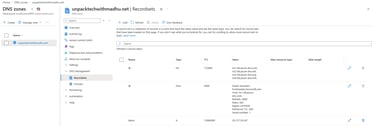
Step 3: Go to deployed Azure DNS resource and update the record set. NS and SOA will auto appear.
As you want to access demo.unpacktechwithmadhu.net, put the A record accordingly. The value will be the public IP of the VM.
Step 4: Now as above you see the nameservers, you need to update those nameservers in Hostinger. Because so far Hostinger has their nameservers registered.
Step 5: Now login to the VM and enable IIS
Open Server Manager.
Add the Web Server (IIS) role.
Browse to: C:\inetpub\wwwroot
Replace the default iisstart.htm with your own index.html
Step 6: Now in your browser hit:
http://demo.unpacktechwithmadhu.net/
You should see below:
DNS resolution flow
Let us understand how above flow works.
When someone visits demo.unpacktechwithmadhu.net:
Hostinger as registrar identifies and informs that nameservers are hosted in Azure DNS zone.
Hostinger's job became only to answer "For unpacktechwithmadhu.net, the authoritative DNS servers are the Azure DNS servers"
Azure DNS resolves it to your VM's public IP based on the A record,
and IIS on the VM serves your demo webpage.
Authoritative DNS Server
Authoritative DNS server is the one which hosts nameservers. Unlike recursive resolver (an ISP or public DNS service like 1.1.1.1 or 8.8.8.8) , it does not use cache to answer any query. It gives final, official answer by querying its own data which is stored in nameservers.
When they answer any query, they include AA flag, informing the answer is direct and IP is official.
Why each Azure DNS Zone has multiple Nameservers?
When you host a domain, Azure DNS Zone by default creates four name servers to ensure high availability.
They belong to different Azure regions to ensure Geo-Redundancy and meeting 99.99% uptime SLA.
If you are querying a nameserver from Europe, your request routes to a region in Europe, if the query is from US,request will route to an Azure region in US.
Each of those 4 nameservers utilizes "Anycast Routing" . Instead of being one single physical machine, these nameservers are broadcast by a globally distributed cluster of servers across multiple Azure regions. You must delegate your domain to all four assigned nameservers in your domain registrar (in our case it is Hostinger).
Does every time authoritative DNS server gets called?
The step by step Recursion process
In first visit the query goes to Authoritative DNS server and then the returned result is stored in cache.
Below are example of recursive resolvers.
When user types the demo.unpacktechwithmadhu.net, recursive resolver asks:
Root Server: The recursive resolver first asks Root Server.The Root server says "I do not know where is unpacktechwithmadhu.net but here is the contact info for .net directory."
TLD Server: Then recursive resolver asks TLD Server. TLD server says "I do not know either, but when I look at the registrar (Hostinger), I see Azure DNS is the authoritative server which owns unpacktechwithmadhu.net"
Authoritative Server: Then recursive resolver asks Authoritative Server (Azure DNS). When Azure DNS answers with IP, recursive resolver returns it to your computer and you are able to open the website.
The secret to speed: Caching
To bypass this exhausting recursive process, when recursive resolver gets the IP, it stores in a short lived cache. Next time when user types "demo.unpacktechwithmadhu.net", instead of going through wholee process, it returns the IP from its cache.
How to verify if answer is returned from the Authoritative Server or cache?
As you see in below image, the flag "Non Authoritative" implies that the returned answer was from one of the available caches.
What is the role of TTL?
The authoritative DNS server sets the TTL for each DNS record.
In Azure,the TTL (in this case it is 3600 seconds) is configured on the DNS record in the Azure DNS Zone. Recursive DNS Resolvers use this TTL to determine how long they may cache the record before querying the authoritative server again.
Important: The TTL is not a timer running inside Azure DNS.
Azure DNS always has the latest record. The TTL is an instruction sent to recursive resolvers.
Common Glitch:
When you have updated A record, until TTL expires, recursive resolvers will continue to serve old IP to your computer.
While you cannot control public resolvers, you can flush your operating system or browser cache. Otherwise in general, DNS propagation can take even more than 24 hours.
What is CNAME?
Suppose you create an app "madhuapp" using app service. Azure automatically gives it a hostname like madhuapp.azureewebsites.net.
Internally it may point to IP 20.x.x.x today and tomorrow to IP 20.x.x.y. So if you only rely on A record which is pointing to an IP, your call for the app can break.
Here comes the role of CNAME. Instead of relying on A record, you create
There is still A record because any hostname will need to be resolved to an IP. But that A record is managed by Azure under azurewebsites.net DNS zone,not by you under the DNS zone unpacktechwithmadhu.net you created. When there will be IP change for app service app, update of A record will be taken care of by Azure. When you create the app service, you need to ensure that you add the custom subdomain app.unpacktechwithmadhu.net and validate it
What is MX record?
An MX (Mail Exchange) record is a DNS record that specifies which mail server is responsible to receive the email for a domain.
if I have hostinger mail id info@madhu.pro, your MX record will look like
If there are multiple MX records (multiple mail servers), the one with the lowest priority will be chosen.
Alias Record, TXT and SOA
Alias Record:
While you can apply CNAME for subdomain demo.unpacktechwithmadhu.net, you may not apply it for the root domain unpacktechwithmadhu.net. Azure comes with a special feature "Alias Record". Alias record does not replace the need of A or AAAA record, it connects the record to a supported Azure resource,so when underlying IP address change, Azure updates it automatically, rather than require you to type the IP manually. An Alias record can be applied to both the root and subdomain.
TXT record:
TXT record is the text information about your domain, it does not point to host name or IP address. Consider it as sticky note for your domain.
TXT record helps in verifying domain ownership, prevents mail spoofing or spamming. There are three kind of TXT records used for email security:
SPF (Sender Policy Framework) - Lists all the authorized IP addresses or mail servers permitted to send email from your domain.
DKIM (Domainkeys Identified Mail): Contains a public cryptographic key. Receiving servers use this key to verify that the email was not altered in transit.
DMARC (Domain-based Message Authentication, Reporting, and Conformance): Tells receiving mail servers if email should be blocked or treated as spam) if the SPF or DKIM checks fail.
Example:
google-site-verification=AbC123XyZ
You can have more than 1 TXT record
SOA:
Azure automatically creates this record. You do not update this in general. Consider it as the birth certificate for your domain.
Conclusion:
In this blog we have explored how DNS plays role in resolving your domain. You got to know about the recordset, caching as well as about Azure specific feature Alias record. Now do some practical and you should feel more confident about appearing in AZ-104 as well as in your daily Azure/cloud computing work.
Previous Lesson
Next Lesson
#AZ-104 #Azure #CloudComputing #DevOps #DNS
<!DOCTYPE html>
<html>
<head>
<title>Azure VM Demo</title>
</head>
<body>
<h1>Welcome to Azure VM</h1>
<h2>This website is hosted on my Azure Virtual Machine.</h2>
</body>
</html>