Join the LinkedIn Public Group – NextOps: Dev, Cloud & Intelligence to connect with professionals, share knowledge, ask questions, and grow together.

Azure Network Security Group (NSG) Made Simple for AZ-104
Today we shall explore the topic of Network Security Group (NSG). If you are preparing for AZ-104 or just want to strengthen your fundamentals about Azure Networking, then this is the article which could help you doing so. After going through it, I truly believe you will have more clarity and confidence regarding handling this complex topic. In this article, we will explore: What is NSG, NSG Rule Components, NSG vs Firewall, Stateful Nature of NSG, Service Tags, Application Security Groups, Common AZ-104 exam points
NETWORKINGAZUREAZ-104
6/29/202610 min read
Prerequisites
You have passed AZ-900 or you have basic knowledge of Azure
If you are unsure where to begin your journey to learn Azure Networking, START HERE
Prerequisites
You have passed AZ-900 or you have basic knowledge of Azure
If you are unsure where to begin your journey to learn Azure Networking, START HERE
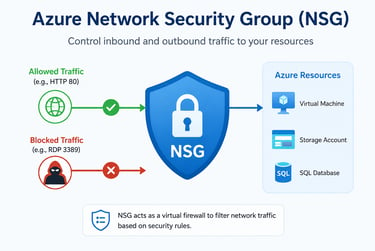
Azure Network Security Groups (NSG) Made Simple for AZ-104
Today we shall explore the topic of Network Security Group (NSG). If you are preparing for AZ-104 or just want to strengthen your fundamentals about Azure Networking, then this is the article which could help you doing so. After going through it, I truly believe you will have more clarity and confidence regarding handling this complex topic.
[If you have missed the first part of my article on Azure Networking, see
here]
In this article, we will explore:
What is NSG?
NSG Rule Components
NSG vs Firewall
Stateful Nature of NSG
Service Tags
Application Security Groups
Common AZ-104 exam points
What is Network Security Group (NSG)?
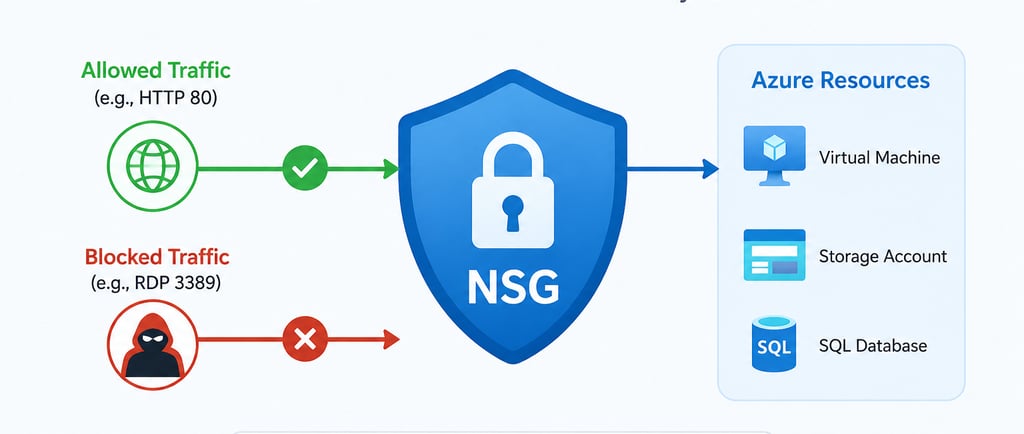
An NSG is a set of security rules that allow or deny network traffic to Azure resources. It acts like a security guard at a building entrance:
checks incoming traffic (inbound)
checks outgoing traffic (outbound)
decides whether to allow or deny traffic based on rules
You can attach an NSG to
A subnet
A network interface (NIC) of a VM
Example:
Suppose you have a VM.
You want:
Allow RDP (3389) from your office IP
Allow web traffic (80, 443) from everyone
Block everything else
You create NSG rules:
The lower the number, the higher the priority is. Rule with priority 100 has the highest priority.
NSG Rule Components:
Default NSG Rules:
Azure automatically provides default rules.
Inbound Defaults:
Outbound Defaults:
Azure Default Inbound Rules
Azure Default Outbound Rules
You cannot delete these defaults, but you can override them with higher prioritized custom rules
NSG vs Firewall
Easy Analogy
Consider NSG as Security Guard
Checks:
Who is coming?
Which door (part)?
Allow or deny?
Consider Azure Firewall as Smart Security Team
Checks:
Who is coming?
Which application?
Which website?
Is it malicious?
Would it be blocked?
Table comparison between NSG and Azure Firewall:
Use NSG when:
Allow/block ports
Restrict VM access
Control Subnet traffic
Basic Network security
When to use Azure Firewall?
Need Centralized Security
Filter web traffic
Allow specific domains
Threat intelligence
Enterprise environments
FYI only (you do not need to know full details of OSI layers for AZ-104, but you should know the basic):
NSG Association:
An NSG can be attached to
NIC level: only that VM is affected
Subnet level: all resources inside that subnet are affected
What happens if NSG exists at both levels?
Traffic must be allowed by both
Think:
Allowed at subnet + allowed at NIC = Allowed
Denied at Subnet or denied at NIC=Denied
Stateful nature of NSG:
NSGs are stateful.
Example:
Inbound HTTP request allowed.
Response traffic is automatically allowed
You do not need a separate outbound rule for the return traffic.
This is commonly tested in AZ-104.
Example: Web Browser access
VM: 10.0.0.4
You create an outbound NSG rule.
VM sends request:
10.0.0.4:50000 -> google.com:443
port 50000 is a temporary (ephemeral) port chosen by the VM.
NSG checks:
Step 1: outbound to port 443? Yes
Allow
Step 2: Google responds:
google.com:443 -> 10.0.0.4:50000
Notice the return traffic is inbound but you do not need to create a separate inbound rule allowing port 50000.
What are Service Tags?
It is important to understand for AZ-104.
Instead of entering IP ranges manually, Azure provides Service Tags.
Common Service Tags:
A service tag is a Microsoft managed group of IP addresses for an Azure Service. Instead of manually entering hundreds or thousands of IP addresses, you use a friendly name.
Suppose your VM needs to access Azure Storage without Service Tags.
NSG Rule:
Destination: 20.150.1.0/24
Destination: 20.151.2.0/24
— — — -
— — — -
Hundreds of more IPs
Also, if Microsoft changes the IP ranges : Your rules become outdated
With Service Tag:
You simply select service tag: Storage
Service tags are Microsoft managed, you cannot create them. Azure automatically manages the underlying IP addresses under a service tag.
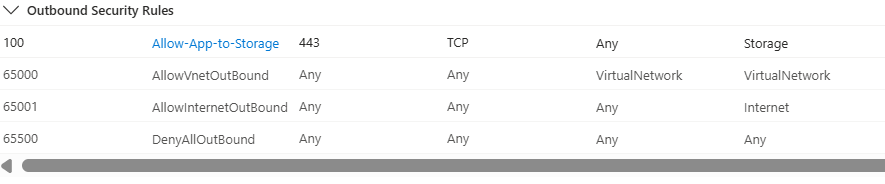
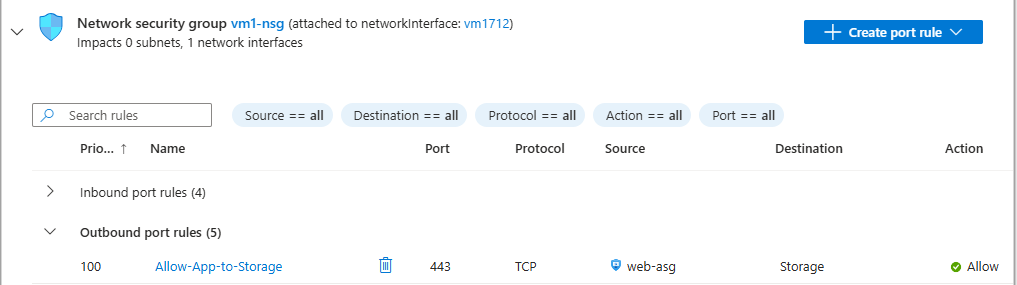
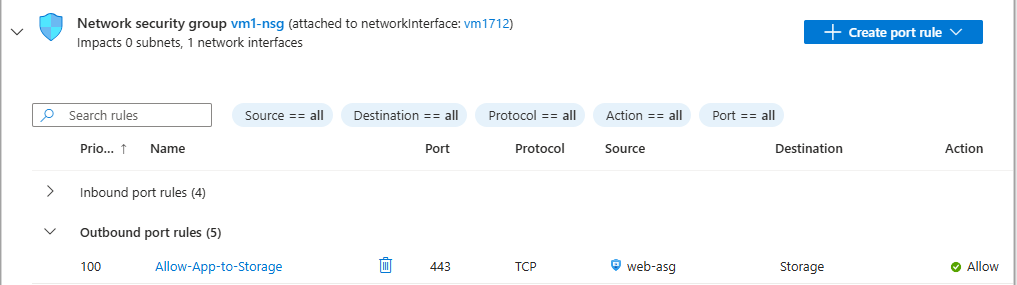
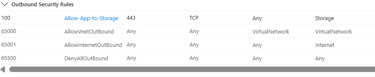
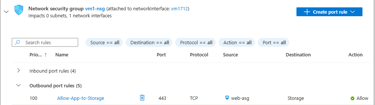
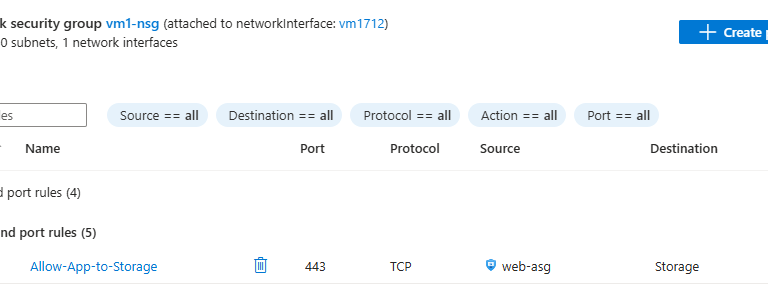
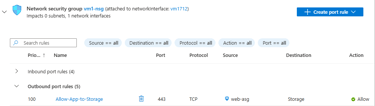
Outbound NSG rule with service tag
Subnet Level NSG:
So far we have seen how to create NIC level NSG.
But as we have mentioned earlier, we can also create NSG at subnet level.
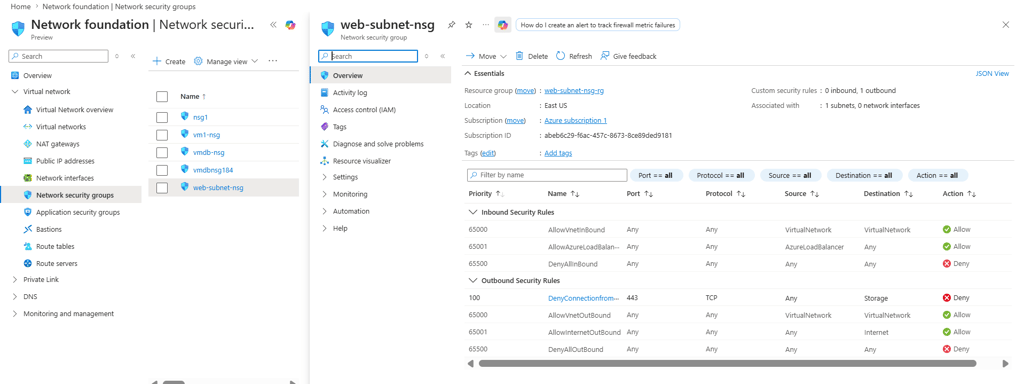
Consider the previous scenario where we have allowed the outbound traffic from our APP VM to Azure Storage. But what if it is blocked at subnet level? When an NSG rule is defined at subnet level, it impacts all VMs in that subnet.
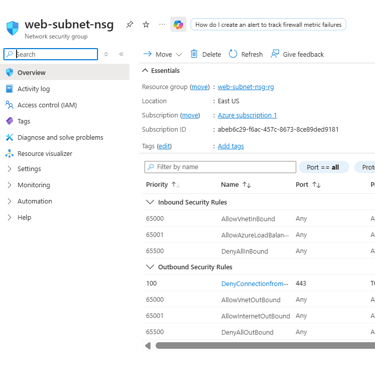
NSG Rule 100 denying traffic to Azure Storage
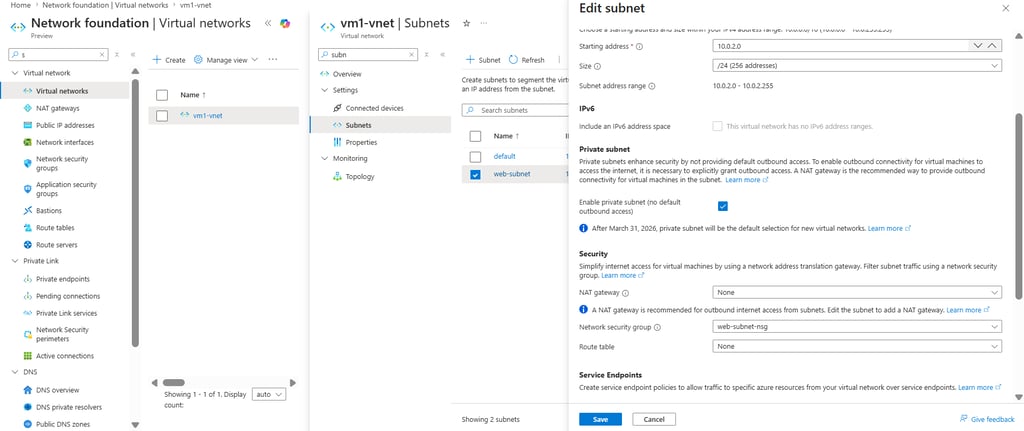
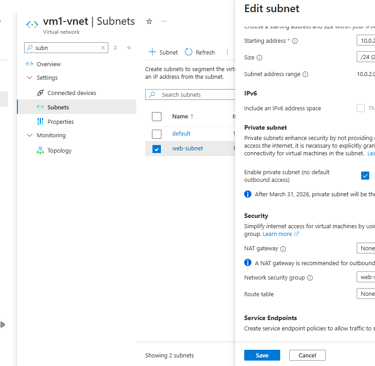
Attach the NSG rule to Subnet
What happens further?
The outbound traffic to Azure Storage is denied. To allow the traffic, it must be allowed at both levels (NIC + Subnet).
Application Security Groups:
ASGs let you group VMs logically.
Example:
You have Web services, App Servers, DB Servers
Rules become:
Web ASG -> App ASG: Allow 8080
App ASG ->DB ASG: Allow 1433
For ASGs to work in an NSG rule, all related VMs must be part of a same VNET. Without ASG, you can have NSG rule associating VMs belonging to different VNETs.
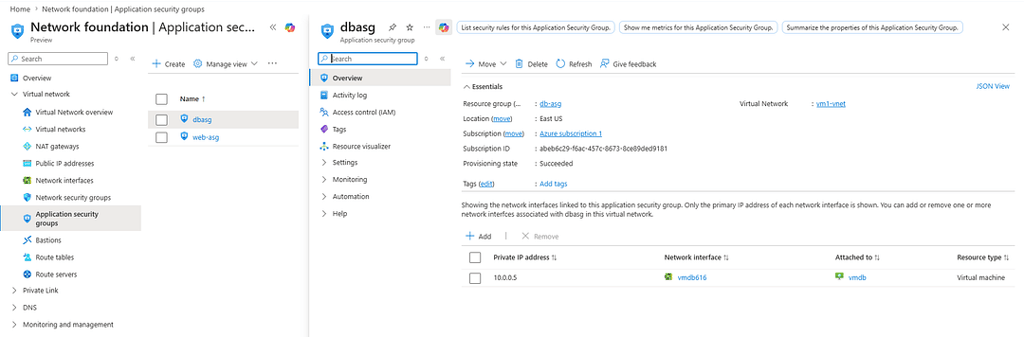
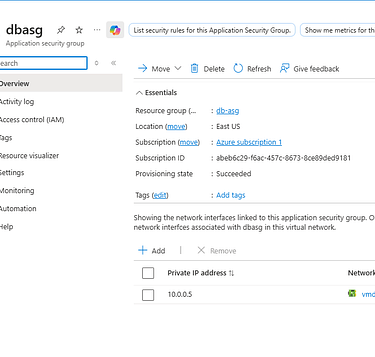
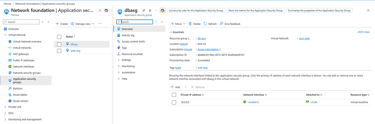
Below is DB ASG:
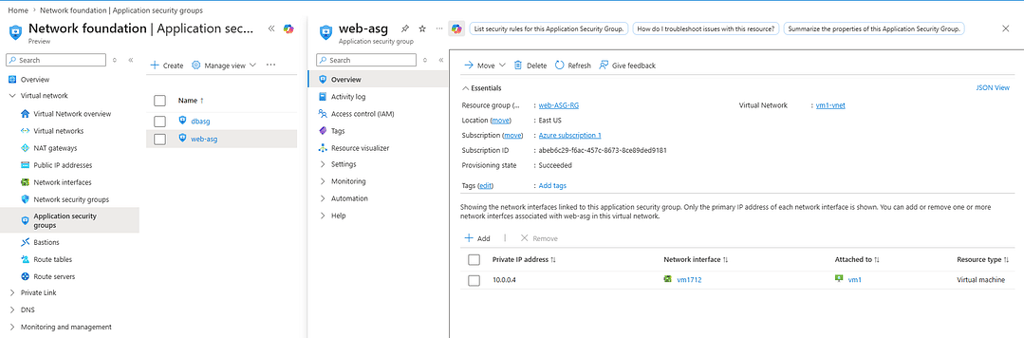
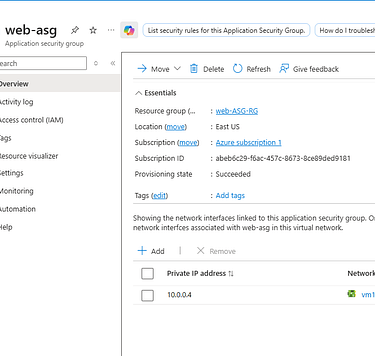
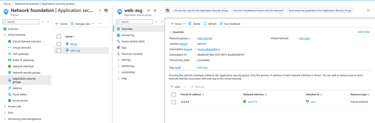
APP ASG:
Both VMs are associated with vm1-vnet.
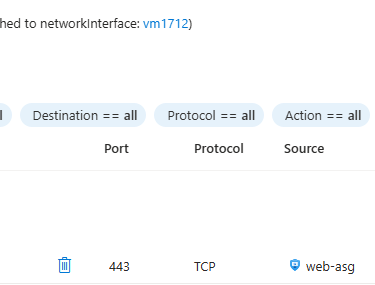
Now create inbound security rule in db VM NIC:
NSG rule with ASG as source and destination
In most cases, you do not need to create outbound rule to allow traffic from App VM to DB VM as you already have Azure default outbound rule in place.
You would need separate outbound rule if you have restricted outbound traffic (Deny) with higher priority (e.g; 110) from your App VM. Then you would require to define another rule with 100 or any higher priority number (priority starts since 100) to allow outbound traffic as 65000 (lower priority) rule will never be reached in this specific situation.
Service Tag vs Application Security Group:
Service Tag represents Azure Services, ASG represents your VMs
Service Tags are created by Microsoft, you create ASG yourself.
Example combining both:
All web servers-> can access -> Azure Storage
Common AZ-104 exam points:
NSG filters inbound and outbound traffic
NSG works at subnet and NIC levels
NSG is stateful
Rules are processed by priority number (lower number first)
You can set priorities anywhere from 100 up to 4096
Default rules exist and cannot be removed
Deny always wins if traffic is denied by either subnet or NIC NSG
NSG operates mainly at Layer 3 and Layer 4 (IP, Port, Protocol)
Azure Firewall provides more advanced filtering than NSG
Service tags reduce IP management
ASGs simplify rule management of groups of VMs
Tip: Create NSG rules with gaps between priority numbers: 100, 110, ….
So if you later need to accommodate some new rule in between, you are able to do so.
Conclusion:
As we have studied about NSG, now we have better clarity how it works, why it is needed and what it covers, what it does not.
Thank you for reading and see you in my next article.
You could reach out to/follow me in LinkedIn
Excited about collaborating with fellow engineers? Connect with the vibrant group
NextOps: Dev,Cloud & Intelligence
Sayonara! See you soon!
Previous Lesson
Next Lesson


Azure Network Security Group (NSG) Made Simple for AZ-104
Today we shall explore the topic of Network Security Group (NSG). If you are preparing for AZ-104 or just want to strengthen your fundamentals about Azure Networking, then this is the article which could help you doing so. After going through it, I truly believe you will have more clarity and confidence regarding handling this complex topic.
[If you have missed the first part of my article on Azure Networking, see
here]
In this article, we will explore:
What is NSG?
NSG Rule Components
NSG vs Firewall
Stateful Nature of NSG
Service Tags
Application Security Groups
Common AZ-104 exam points
What is Network Security Group (NSG)?
An NSG is a set of security rules that allow or deny network traffic to Azure resources. It acts like a security guard at a building entrance:
checks incoming traffic (inbound)
checks outgoing traffic (outbound)
decides whether to allow or deny traffic based on rules
You can attach an NSG to
A subnet
A network interface (NIC) of a VM
Example:
Suppose you have a VM.
You want:
Allow RDP (3389) from your office IP
Allow web traffic (80, 443) from everyone
Block everything else
You create NSG rules:
The lower the number, the higher the priority is. Rule with priority 100 has the highest priority.
NSG Rule Components:
Default NSG Rules:
Azure automatically provides default rules.
Inbound Defaults:
Outbound Defaults:
Azure Default Inbound Rules
Azure Default Outbound Rules
You cannot delete these defaults, but you can override them with higher prioritized custom rules
NSG vs Firewall
Easy Analogy
Consider NSG as Security Guard
Checks:
Who is coming?
Which door (part)?
Allow or deny?
Consider Azure Firewall as Smart Security Team
Checks:
Who is coming?
Which application?
Which website?
Is it malicious?
Would it be blocked?
Table comparison between NSG and Azure Firewall:
Use NSG when:
Allow/block ports
Restrict VM access
Control Subnet traffic
Basic Network security
When to use Azure Firewall?
Need Centralized Security
Filter web traffic
Allow specific domains
Threat intelligence
Enterprise environments
FYI only (you do not need to know full details of OSI layers for AZ-104, but you should know the basic):
NSG Association:
An NSG can be attached to
NIC level: only that VM is affected
Subnet level: all resources inside that subnet are affected
What happens if NSG exists at both levels?
Traffic must be allowed by both
Think:
Allowed at subnet + allowed at NIC = Allowed
Denied at Subnet or denied at NIC=Denied
Stateful nature of NSG:
NSGs are stateful.
Example:
Inbound HTTP request allowed.
Response traffic is automatically allowed
You do not need a separate outbound rule for the return traffic.
This is commonly tested in AZ-104.
Example: Web Browser access
VM: 10.0.0.4
You create an outbound NSG rule.
VM sends request:
10.0.0.4:50000 -> google.com:443
port 50000 is a temporary (ephemeral) port chosen by the VM.
NSG checks:
Step 1: outbound to port 443? Yes
Allow
Step 2: Google responds:
google.com:443 -> 10.0.0.4:50000
Notice the return traffic is inbound but you do not need to create a separate inbound rule allowing port 50000.
What are Service Tags?
It is important to understand for AZ-104.
Instead of entering IP ranges manually, Azure provides Service Tags.
Common Service Tags:
A service tag is a Microsoft managed group of IP addresses for an Azure Service. Instead of manually entering hundreds or thousands of IP addresses, you use a friendly name.
Suppose your VM needs to access Azure Storage without Service Tags.
NSG Rule:
Destination: 20.150.1.0/24
Destination: 20.151.2.0/24
— — — -
— — — -
Hundreds of more IPs
Also, if Microsoft changes the IP ranges : Your rules become outdated
With Service Tag:
You simply select service tag: Storage
Service tags are Microsoft managed, you cannot create them. Azure automatically manages the underlying IP addresses under a service tag.
Outbound NSG rule with service tag
Subnet Level NSG:
So far we have seen how to create NIC level NSG.
But as we have mentioned earlier, we can also create NSG at subnet level.
Consider the previous scenario where we have allowed the outbound traffic from our APP VM to Azure Storage. But what if it is blocked at subnet level? When an NSG rule is defined at subnet level, it impacts all VMs in that subnet.
NSG Rule 100 denying traffic to Azure Storage
Attach the NSG rule to Subnet
What happens further?
The outbound traffic to Azure Storage is denied. To allow the traffic, it must be allowed at both levels (NIC + Subnet).
Application Security Groups:
ASGs let you group VMs logically.
Example:
You have Web services, App Servers, DB Servers
Rules become:
Web ASG -> App ASG: Allow 8080
App ASG ->DB ASG: Allow 1433
For ASGs to work in an NSG rule, all related VMs must be part of a same VNET. Without ASG, you can have NSG rule associating VMs belonging to different VNETs.
Below is DB ASG:
APP ASG:
Both VMs are associated with vm1-vnet.
Now create inbound security rule in db VM NIC:
NSG rule with ASG as source and destination
In most cases, you do not need to create outbound rule to allow traffic from App VM to DB VM as you already have Azure default outbound rule in place.
You would need separate outbound rule if you have restricted outbound traffic (Deny) with higher priority (e.g; 110) from your App VM. Then you would require to define another rule with 100 or any higher priority number (priority starts since 100) to allow outbound traffic as 65000 (lower priority) rule will never be reached in this specific situation.
Service Tag vs Application Security Group:
Service Tag represents Azure Services, ASG represents your VMs
Service Tags are created by Microsoft, you create ASG yourself.
Example combining both:
All web servers-> can access -> Azure Storage
Common AZ-104 exam points:
NSG filters inbound and outbound traffic
NSG works at subnet and NIC levels
NSG is stateful
Rules are processed by priority number (lower number first)
You can set priorities anywhere from 100 up to 4096
Default rules exist and cannot be removed
Deny always wins if traffic is denied by either subnet or NIC NSG
NSG operates mainly at Layer 3 and Layer 4 (IP, Port, Protocol)
Azure Firewall provides more advanced filtering than NSG
Service tags reduce IP management
ASGs simplify rule management of groups of VMs
Tip: Create NSG rules with gaps between priority numbers: 100, 110, ….
So if you later need to accommodate some new rule in between, you are able to do so.
Conclusion:
As we have studied about NSG, now we have better clarity how it works, why it is needed and what it covers, what it does not.
Thank you for reading and see you in my next article.
You could reach out to/follow me in LinkedIn
Excited about collaborating with fellow engineers? Connect with the vibrant group
NextOps: Dev,Cloud & Intelligence
Sayonara! See you soon!
Previous Lesson
Next Lesson